Implementing CI/CD with Docker, TeamCity and AWS-CLI
Software deployment used to be manual, slow, and prone to errors.
DevOps enters the scene, suggesting a cultural shift of automation, shared responsibility and transparency, breaking down the siloed barriers between development and operations.
In that spirit, this project demonstrates what a fully automated end-to-end pipeline for a cloud-native web application could look like, implemented on a lower-abstraction platform.
TL;DR: with the push of a button, images are built, tests run, containers deployed, and metrics monitored.
Tools and platforms
- TeamCity for build orchestration
- Docker for containerization
- AWS cloud services
- Command-line Interface (CLI) for calling AWS services
- Elastic Container Registry (ECR) for container repository
- Elastic Container Service (ECS) for running serverless containers
- CloudWatch for observability
Testing strategy
Various levels of testing were implemented to ensure code quality and reliability:
- Smoke tests to quickly verify no compilation errors
- Full test suite achieving 100% code coverage, including:
- Unit tests to validate arithmetic logic
- UI tests to simulate user interactions using testing libraries
CI/CD implementation
TeamCity setup
Since the cloud version of TeamCity only entails 2 weeks of free trial, I opted for self-hosting the on-prem version locally1. Setting up TeamCity began with getting the Windows distribution, then installing and configuring it to work on my development machine. To their credit, this step of the process was straightforward, with a friendly installation wizard guiding me through every step.
After installation, I created an admin account and made a new root project dedicated to the app. To enable integration with version control, I authenticated the project to my GitHub account via OAuth app. This process was also very well-documented through TeamCity's setup guides.
Finally, I enabled Configuration-as-Code to enable writing build configurations in Kotlin DSL, which conforms to the principles of GitOps better and reduces reliance on the UI for ongoing maintenance.
Docker setup
2 Dockerfiles were defined to separate build and production concerns:
- Dockerfile.src: Used for running tests against the application source code.
- Dockerfile.prod: Used for the production image, optimized for size.
Dockerfile.src
In this image, we set up a base Node.js environment, install dependencies, and copy the source code over for testing.
FROM node:22-alpine

WORKDIR /app
COPY package*.json ./
RUN if [ -f package-lock.json ]; then npm ci --silent; else npm install --silent; fi

COPY . .
Dockerfile.prod
In this image, we copy the build artifacts from the previous stage to a lightweight Node environment, install serve, and expose HTTP port 80 to begin running the application.
FROM calcapp:src AS builder
RUN npm run build

FROM node:22-alpine AS production
COPY --from=builder /app/dist ./dist
RUN npm install -g serve --silent

EXPOSE 80
CMD ["serve", "-s", "dist", "-l", "80"]
AWS environment setup
Configuring AWS for the deployment environment involved working with several services.
ECR
First, I created an ECR repository2 to hold the production Docker image built during the CI/CD process. After creation, a handy script snippet was offered to push images via the CLI, which worked out of the box.
ECS
I set up a cluster to provide the compute environment, then defined a task definition that specified the container configuration, including CPU, memory, networking settings, observability level, and image to use - in this demo, the :latest tag3.
I then created a service within the cluster to serve as the target for manual restarts from the CLI, with several key parameters:
- Desired count of 1 task instance
- Rolling update deployment strategy
- Minimum running tasks of 100%
- Maximum running tasks of 200%
When a new deployment is triggered:
- If there are 2 or more running (e.g. past deployment in-progress), ECS will wait until the past deployment completes.
- Otherwise, ECS will launch a new task instance with the updated image, then wait until it passes health checks.
- If it reports healthy, stop old task instance.
- If it reports unhealthy, the old task instance continues running, serving traffic on the previous software version.
This setup enables zero-downtime production deployments, maintaining service availability during releases while still optimizing costs (never more than 2 running instances simultaneously).
To enhance observability, I enabled CloudWatch metrics for monitoring container performance and health.
Setup AWS credentials as environment secrets in TeamCity
This is where the beauty of using AWS CLI shines - with the right environment variables4 injected, authentication and authorization happens effortlessly in the background, without any manual identity passing. TeamCity build agents can interact with AWS services via the self-authenticating CLI installed on the host machine, eliminating the need to manage any external permissions.
Build steps
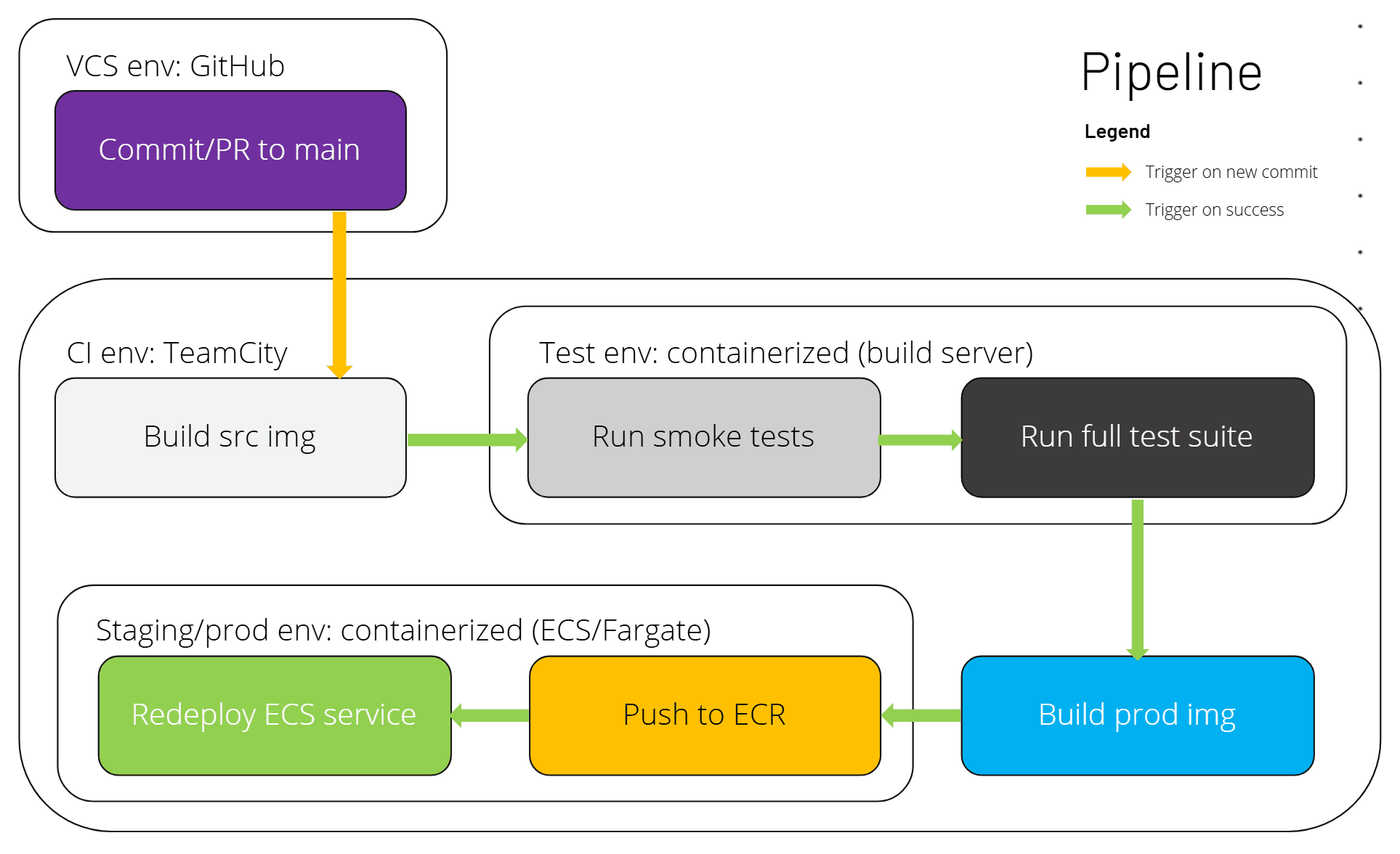
Each subsequent step depends on the success of the previous one, meaning a single failure halts the entire pipeline execution, effectively making the pipeline sequential.
Build source image
Triggered by commits to the main branch, this step builds a local image from Dockerfile.src and tags it as calcapp:src, using --pull to download any missing base images.
object BuildSourceImage : BuildType({
    name = "Build source image"

    steps {
        dockerCommand {
            commandType = build {
                source = file { path = "Dockerfile.src" }
                namesAndTags = "calcapp:src"
                commandArgs = "--pull"
            }
        }
    }

    triggers {
        vcs { branchFilter = "+:main" }
    }
})
Run smoke tests
Executes smoke tests on calcapp:src, acting as a gate to prevent further steps if any test fails. The --rm flag removes the container after completion.
object SmokeTest : BuildType({
    name = "Run smoke tests on local container"

    steps {
        dockerCommand {
            commandType = other {
                subCommand = "run"
                commandArgs = "--rm calcapp:src npm run test:smoke"
            }
        }
    }

    triggers {
        finishBuildTrigger {
            buildType = "BuildSourceImage"
            successfulOnly = true
        }
    }
})
Run full test suite
Runs the complete test suite on calcapp:src, assuming the image remains unchanged from the previous step.
object FullTest : BuildType({
    name = "Run full test suite on local container"

    steps {
        dockerCommand {
            commandType = other {
                subCommand = "run"
                commandArgs = "--rm calcapp:src npm run test:full"
            }
        }
    }

    triggers {
        finishBuildTrigger {
            buildType = "SmokeTest"
            successfulOnly = true
        }
    }
})
Build production image
Builds the final production image from Dockerfile.prod and tags it as calcapp:prod, assuming calcapp:src is unchanged.
object BuildProductionImage : BuildType({
    name = "Build production image"

    steps {
        dockerCommand {
            commandType = build {
                source = file { path = "Dockerfile.prod" }
                namesAndTags = "calcapp:prod"
            }
        }
    }

    triggers {
        finishBuildTrigger {
            buildType = "FullTest"
            successfulOnly = true
        }
    }
})
Push production image to ECR
Authenticates to ECR, retags calcapp:prod for the remote repository, and pushes it. Assumes AWS CLI is configured and the ECR repository exists.
object PushProductionImageToECR : BuildType({
    name = "Push production image to ECR"

    steps {
        script {
            name = "Authenticate to ECR"
            scriptContent = """
                aws ecr get-login-password --region %env.AWS_DEFAULT_REGION% | ^
                    docker login --username AWS --password-stdin ^
                    %env.AWS_ACCOUNT_ID%.dkr.ecr.%env.AWS_DEFAULT_REGION%.amazonaws.com
            """.trimIndent()
        }

        script {
            name = "Tag & push production image to ECR"
            scriptContent = """
                docker tag calcapp:prod
                  %env.AWS_ACCOUNT_ID%.dkr.ecr.%env.AWS_DEFAULT_REGION%.amazonaws.com/%env.ECR_REPOSITORY_NAME%:prod
                docker push
                  %env.AWS_ACCOUNT_ID%.dkr.ecr.%env.AWS_DEFAULT_REGION%.amazonaws.com/%env.ECR_REPOSITORY_NAME%:prod
            """.trimIndent()
        }
    }

    triggers {
        finishBuildTrigger {
            buildType = "BuildProductionImage"
            successfulOnly = true
        }
    }
})
Restart production ECS service
Forces the ECS service to restart with a rolling update, applying the new image. Assumes the ECS cluster and service are configured correctly.
object RestartProductionECSService : BuildType({
    name = "Restart production ECS service"

    steps {
        script {
            scriptContent = """
                aws ecs update-service ^
                  --region %env.AWS_DEFAULT_REGION% ^
                  --cluster %env.ECS_CLUSTER_NAME% ^
                  --service %env.ECS_SERVICE_NAME% ^
                  --force-new-deployment
            """.trimIndent()
        }
    }

    triggers {
        finishBuildTrigger {
            buildType = "PushProductionImageToECR"
            successfulOnly = true
        }
    }
})
Limitations
TeamCity
Low-automation
On the automation scale, TeamCity sits toward the low-abstraction end, akin to Jenkins, offering extensive control but at the cost of complexity. This design choice provides power for intricate setups but created a steep learning curve for our inexperienced team, with much time spent adapting/writing new recipes to our needs.
On the other end of the spectrum, GitHub Actions offers many features out of the box, enabling quicker setup and easier maintenance. Its YAML-based configuration and tight integration with GitHub streamline CI/CD processes, making it more accessible for teams with lower expertise levels. As a tradeoff, this abstraction can limit customization and control for more complex workflows.
ClickOps
TeamCity's ClickOps interface feels outdated compared to modern tools. While supporting Configuration-as-Code, UI overrides can disrupt audit trails and repeatability, violating GitOps principles. Internal resolvers often fail to merge configurations with UI overrides, reverting to stale cached configs, undermining build transparency and reliability.
Proprietary tooling
Configurations are scripted in Kotlin DSL, requiring JetBrains IDEs and a Gradle setup for optimal tooling support. As a proprietary JetBrains product, this vendor lock-in is reasonable, but still potentially a determinant factor against wider adoption, as projects may prefer more open alternatives.
Pipeline
Locally-hosted build server
Not being cloud-native means the pipeline lacks several advanced features that are standard in hosted CI/CD platforms. For instance, there are no push or pull request-triggered webhooks, which would automatically initiate builds upon code changes or merge requests, removing the need for polling. Additionally, automated code reviews and approvals for merging are absent5, requiring manual intervention for quality checks and integration.
Platform dependency
Running TeamCity on the default Windows CMD agent introduced significant bottlenecks. CMD's scripting limitations necessitated verbose workarounds for tasks like variable handling and conditionals, slowing development and highlighting the challenges of platform-dependency in CI/CD pipelines.
Host dependency
The reliance on the host machine's configuration, including installed software (Docker, AWS CLI) and data (built images), can lead to inconsistencies across different build agents. This dependency complicates the setup process and may introduce unexpected behaviors if the host environment changes, making it harder to ensure reproducible builds.
The current pipeline is sequential. In more complex, resource-intensive workflows where parallelizing pipeline execution is necessary for achieving reasonable build times, a different setup to decouple the build server from the host environment is required, such as by using a separate build server running Docker whose output is written to a cloud image repository.
Footnotes
-
Thanks to the classic hoarding disorder ("What if I happen to need those 2 weeks of free trial in the future???"), this was the beginning of the very end. On the other hand, this gave me full control (and more drama) setting up the environment and tweaking it to work, which can arguably be viewed as more exposure/experience. ↩
-
The choice to go with ECR rather than alternatives like Docker Hub was driven by its seamless integration with other services within the AWS ecosystem, particularly ECS. This integration simplifies authentication and authorization processes (taking advantage of IAM permissions), allowing for smoother deployments. ↩
-
For cost optimization, in this demo setup, the ECR repository has a lifecycle configuration to only retain the most up-to-date image tagged with
:latest, hence the intentional tag collision to override the previous version. In a production context, it is advisable to use unique version tags (e.g., using the latest SHA commit hash) and keep at least multiple latest image versions to ensure stability and traceability of deployments, allowing for easier rollbacks and diagnosis on which version of the application a task instance is currently running. ↩ -
The required environment variables include
AWS_ACCESS_KEY_IDandAWS_SECRET_ACCESS_KEY. Defined with the.envprefix, these parameters are made available to the process of a build runner, alongside default system environment variables. This means if TeamCity omits defining these credentials, the build tasks will fallback to using any saved credentials found on the host machine, but it is still best practice to:- Create dedicated IAM users for CI/CD pipelines following least-privilege principle
- Explicitly assign those credentials to the TeamCity project as password parameters to achieve better environment isolation.
-
While technically it is possible to setup a pipeline trigger to run on pull requests and write a custom approval step after all tests pass, since the pipeline is running locally and operates on a polling basis, it is not realistic or reliable to require this check before allowing merge. ↩