Behind the Rift
Over the course of its development, Rift & Sync received many praises for its innovative voronoi screen play and the resulting perspective-driven puzzle design. I've been asked this one question many more times than I can recount:
How is this possible?
Hence, the purpose of this blog: to part the curtains and unveil the magic behind the rift!
Unveiling the Rift
Before we proceed any further, credits where it's due: the idea would never have taken flight if not for this asset store package. FYI, the package supports up to 4 players, and comes with a variety of options for fine-tuning the split-screen behavior to a great degree.
The gist
When an object crosses over the rift, what happens under the hood is:
- The original object - A - gets cloned.
- The clone - B - is placed on-screen in the exact position to match up with A.
- Sync A and B's physical attributes exactly - have one copy the other's momentum, torque, etc.
- Wait until either A or B fully crosses over, at which point clean up the non-visible counterpart.
Sounds simple, doesn't it? The devil, unfortunately, lies in the details.
Cloning the object
To make the best use of the physics engine, objects are typically stateless by design, and remain so unless required otherwise. This meant cloning an object can be as simple as:
GameObject ghost = Instantiate(gameObject, transform.parent, true);
This is triggered by the rift barrier (i.e. a player's visible boundary), via the physics engine's callback OnTriggerEnter. It associates the riftable object with the specific side it came into contact with.
private void OnTriggerEnter(Collider other)
{
  if (other.gameObject.TryFindImmediateComponent(out IRiftable riftable)
    && riftable.GameObject.InLayerMask(riftableLayer))
  {
    //Debug.Log($"{riftable} entered rift");
    OnEnter?.Invoke(this, riftable);
  }
}
This event is bound to another callback on the rift traversal service, which maintains the internal list and defines utilitary methods for operating on crossover items:
private void OnEnterRift(object sender, IRiftable riftableObject)
{
  if (TryGetTouchingRift(riftableObject, out _)) // already touching either rift
    return;

  if (IsBetweenRift(riftableObject.Position)) // verify visible to camera (no teleport off-cam)
  {
    // Debug.Log($"{riftableObject} is caught between rifts -> culled");
    return;
  }

  RiftBarrier rift = sender as RiftBarrier;
  //Debug.LogWarning($"{riftableObject} touched {rift} & started rifting");

  rifting[rift].Add(riftableObject);
  riftableObject.ActivateGhost(
    riftableObject.Position + GetTranslation(rift),
    riftableObject.Rifting[GetOther(rift).Role],
    riftableObject.Rifting[rift.Role]);
}
Finally, it dispatches the call to activate a ghost at the projected crossover position, passing along relevant data to delegate the rest of the job to the IRiftable itself.
Placement of the ghost
Once cloned, the ghost will copy the original's position and rotation in world space:
ghost.transform.SetPositionAndRotation(position, transform.rotation);
In order to manually override the object's position and rotation, its Rigidbody must be set to kinematic beforehand.
Syncing attributes
This is where it gets exciting. With the way the voronoi splitscreen works, the 2 rift barriers is always parallel to each other and perpendicular to the line connecting the two players. Once this information is extracted from the package, syncing A and B can be done via the concept quantum entanglement (and no, it's pseudo-science taken directly from sci-fi flicks, don't bother):
- Make B a view-only presentation of A - disable B's physics simulation, manually copy A's position and rotation over to B every physics simulation frame.
- Project B at the rift offset with regards to A - this will ensure the objects visually connect and appear to be one seamless object.
Ghost = ghost.GetComponent<RiftableObject>();

Ghost.GameObject.SetLayerMask(ghostLayer); // disable B's physics collision
Ghost.AttachTo(rb); // setup B to mirror A's position and rotation at the rift-defined offset
public sealed class Entanglement
{
  internal Rigidbody Origin { get; private set; }
  internal Vector3 TranslationOffset { get; private set; }

  // initialize quantum entanglement behavior
  internal void AttachTo(Rigidbody rb) => Origin = rb;
  // kept up-to-date every physics frame by rift-tracking service
  internal void Update(Vector3 translation) => TranslationOffset = translation;
  internal void Clear()
  {
    Origin = null;
    TranslationOffset = Vector3.zero;
  }

  internal bool Active => Origin != null;
}
protected virtual void FixedUpdate() // called by Unity every physics simulation frame
{
  if (Attachment.Active) // override ghost's position/rotation with OG + projection
  {
    rb.MovePosition(Attachment.Origin.position + Attachment.TranslationOffset);
    rb.MoveRotation(Attachment.Origin.rotation);
  }
}
Clean-up
The actual tear-down is simple; it's defining which counterpart to clean up that's the tricky part. On theory, we always want to clean up whichever copy is entirely not visible to both players. However, it's not as easy in practice to make this distinction, as objects can (and will) get stuck in weird in-between positions where both copies are partially visible to both players.
The approach followed relies heavily on the physics engine's callback OnTriggerExit and an internal list to keep track of object's crossover state.
private void OnTriggerExit(Collider other)
{
  if (other.gameObject.TryFindImmediateComponent(out IRiftable riftable)
    && riftable.GameObject.InLayerMask(riftingLayer[role]))
  {
    //Debug.Log($"{riftable} exited rift");
    OnExit?.Invoke(this, riftable);
  }
}
private void OnExitRift(object sender, IRiftable riftableObject)
{
  if (TryGetTouchingRift(riftableObject, out RiftBarrier rift)
    && (RiftBarrier)sender == rift) // only fire once on relevant side
  {
    Assert.IsTrue(riftableObject.Ghosting); // already ghosting
    rifting[rift].Remove(riftableObject);

    if (IsBetweenRift(riftableObject.Position)) // original object in-between rift
    {
      //Debug.LogWarning($"{riftableObject} exited rift on non-visible side");
      riftableObject.PossessGhost();
    }
    else
    {
      //Debug.LogWarning($"{riftableObject} exited rift on visible side");
      riftableObject.DeactivateGhost();
    }
  }
}
To summarize the key points:
- We only run the logic once, on the same original copy that was registered with one of the rifts upon first contact.
- By setting its ghost on a dedicated layer whose physics collision are disabled, we ignore any unreliable duplicate events emitted from the physics engine after teleporting the ghost into place.
- We process the exit event only on the entanglement host:
- If the host ends up in-between the rifts (i.e. out of visible area), we possess (make primary) its ghost and clean up (destroy) the host.
- Otherwise, the host ends up on the other side of either rift (visible), in which case we deactivate (destroy) its ghost.
- Either way, we unregister the host from the rift traversal service. If the object is thrown over the rift again in the future, a new association is registered.
Technical constraints
Edge case handling
While defining a set of custom physics behavior comes with its own set of challenges, the biggest limitations that relying on the physics engine impose is how to reconcile special defined behaviors with playability-driven exceptions. I will illustrate more of this point by providing specific instances where a behavior needs to override a system-defined default.
Crossover with momentum
In the typical case where an object crossing over isn't embodying some momentum, its ghost can simply be cloned and positioned statically at the projected destination. The original object will remain in view until the first player has fully moved back, thus the transition is slow and predictable.
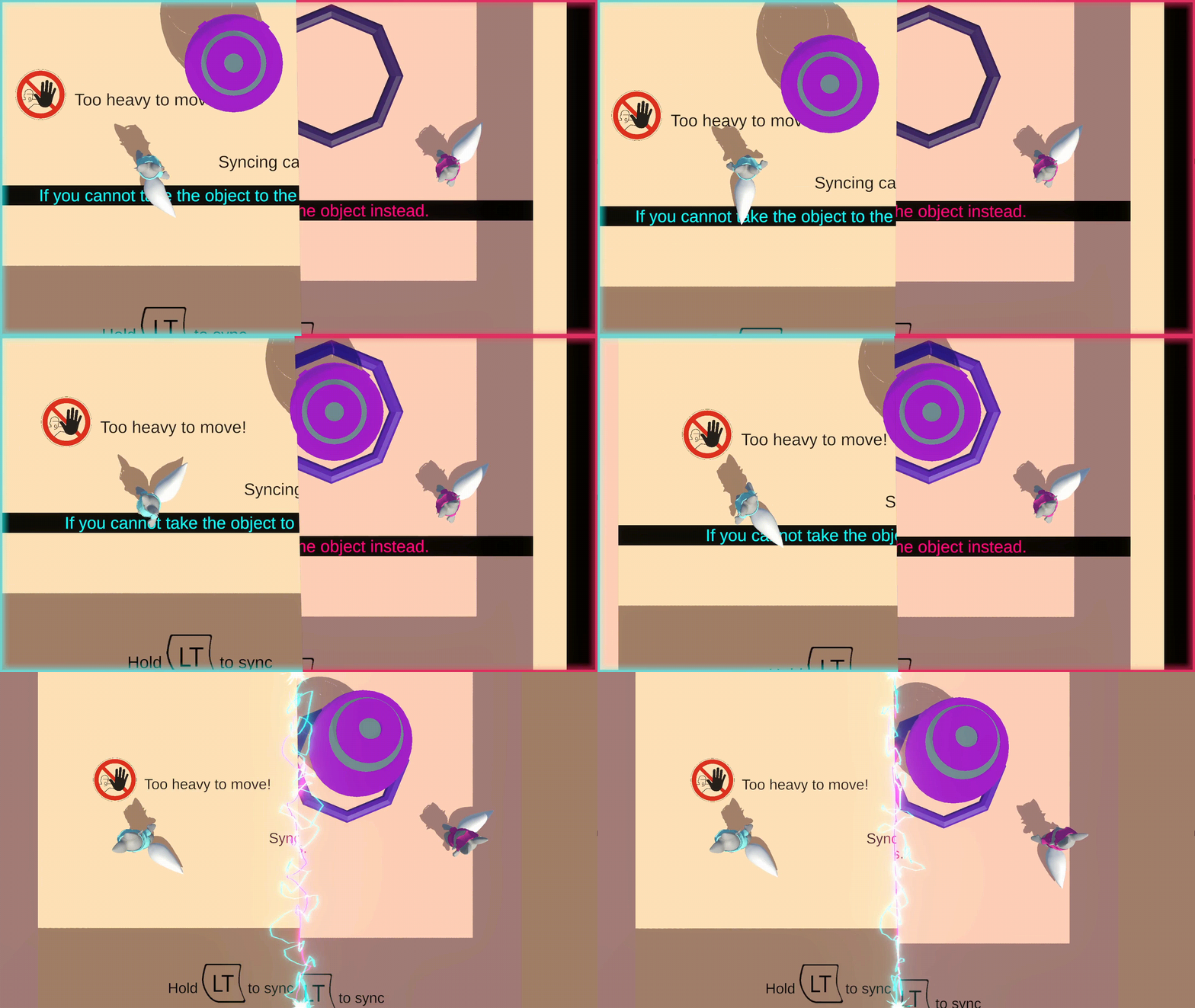
However, in case an object is being tossed across the rift, there are many edge cases that can cause players confusion.
- What if the original object, A, hits a wall that is positioned within the in-between zone that neither player can see?
- Does the object bounce back for seemingly no reason?
- Does it continue onwards, ignoring the physical obstruction in its path?
- How should this behavior best be conveyed to the player?
- What if the copied object, B, hits a wall immediately after crossing over?
- Does the object bounce back, and immediately cross-over back to the first region?
- Does the object bounce back physically, ignoring the rift and ending up within the invisible in-between zone?
- Even if the second player sees this wall, the first player typically doesn't pay attention to anything beyond their immediate side of the screen. How should this behavior be conveyed to the first player?
These are all valid concerns that arose during development and playtest.
Despite trying many different designs during iterative development, the prototype still hasn't resolved all these issues to a satisfactory ideal.
The approach adopted by the current solution is to leverage a UI trajectory indicator that previews the movement of thrown objects. The difficulty then becomes how to implement this UI element to preview as accurate an indicator to the final physics simulation, taking into account all the edge cases and custom behavior overrides.
Physics behavior override
To prioritize player comprehension and streamline mechanics to promote the most intuitive understanding, a design philosophy is:
What the player sees goes.
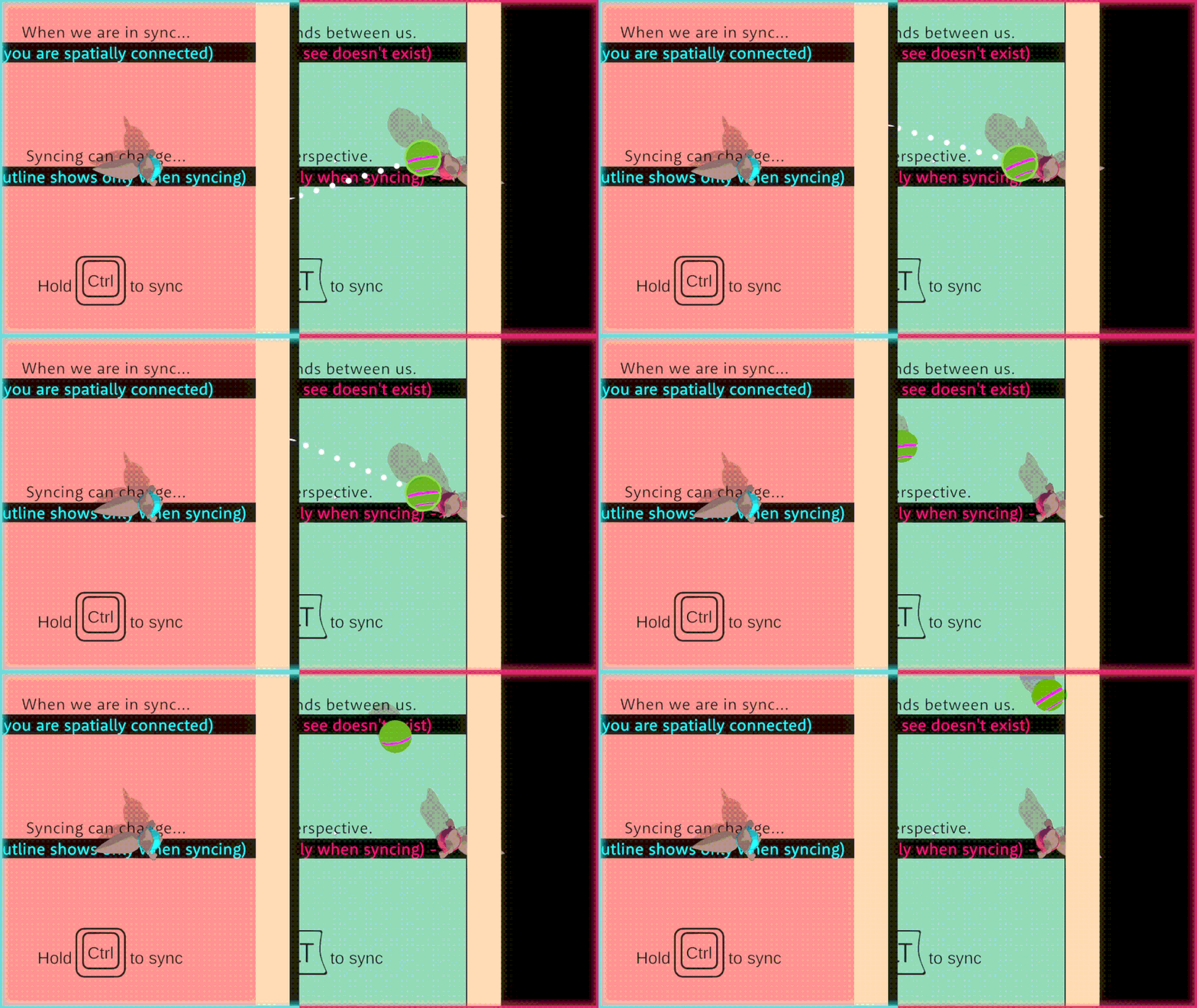
In the case of a rapidly-moving riftable object, the moment A touches one side of the rift, its ghost (B) gets cloned over and positioned with the offset. Assumming no trajectory change, B will immediately become partially visible to the second player, and will grow more visible proportional to A moving into the in-between zone.
From the basis of this behavior, after an object has entered the crossover state, we only care about collisions that happen on the B side. Hence, in the case of a fast-moving riftable object crossover, we reverse the flow of quantum entanglement:
- Upon touching the rift, A will play the role of the ghosting projection (i.e. have its collisions disabled and begin copying position/rotation every frame).
- B, after being placed at the projected position, will copy over A's physical attributes at the moment of crossing (angular and linear velocity), and resume physics simulation as the origin of the entanglement. B will be registered to the rift traversal service, associated with the second rift barrier.
- During crossover, In case B hits a wall that is visible to the second player, it will bounce back as dictated by normal physics behavior. Since A is only acting as a ghosting projection, it will also appear to bounce back, maintaining visual cohesion.
- When B fully stops touching the second rift (either by fully passing through or bouncing back), depending on which copy is fully within view, activate that copy and clean up the invisible clone.
private void OnEnterRift(object sender, IRiftable riftableObject)
{
  // ...
  if (riftableObject is ThrownRiftable thrown) // for thrown riftable
  {
    RiftBarrier otherRift = GetOther(rift);

    rifting[otherRift].Add(thrown); // A registered as ghost projection
    thrown.ActivateGhost( // B acts as origin
      thrown.Position + GetTranslation(rift),
      thrown.Rifting[rift.Role],
      thrown.Rifting[otherRift.Role]);
    return;
  }
  // normal behavior: A acting as origin, B projected as ghost
}
Illegal state prevention - blocking physics-subversive crossover
Another commonly-encountered edge case:
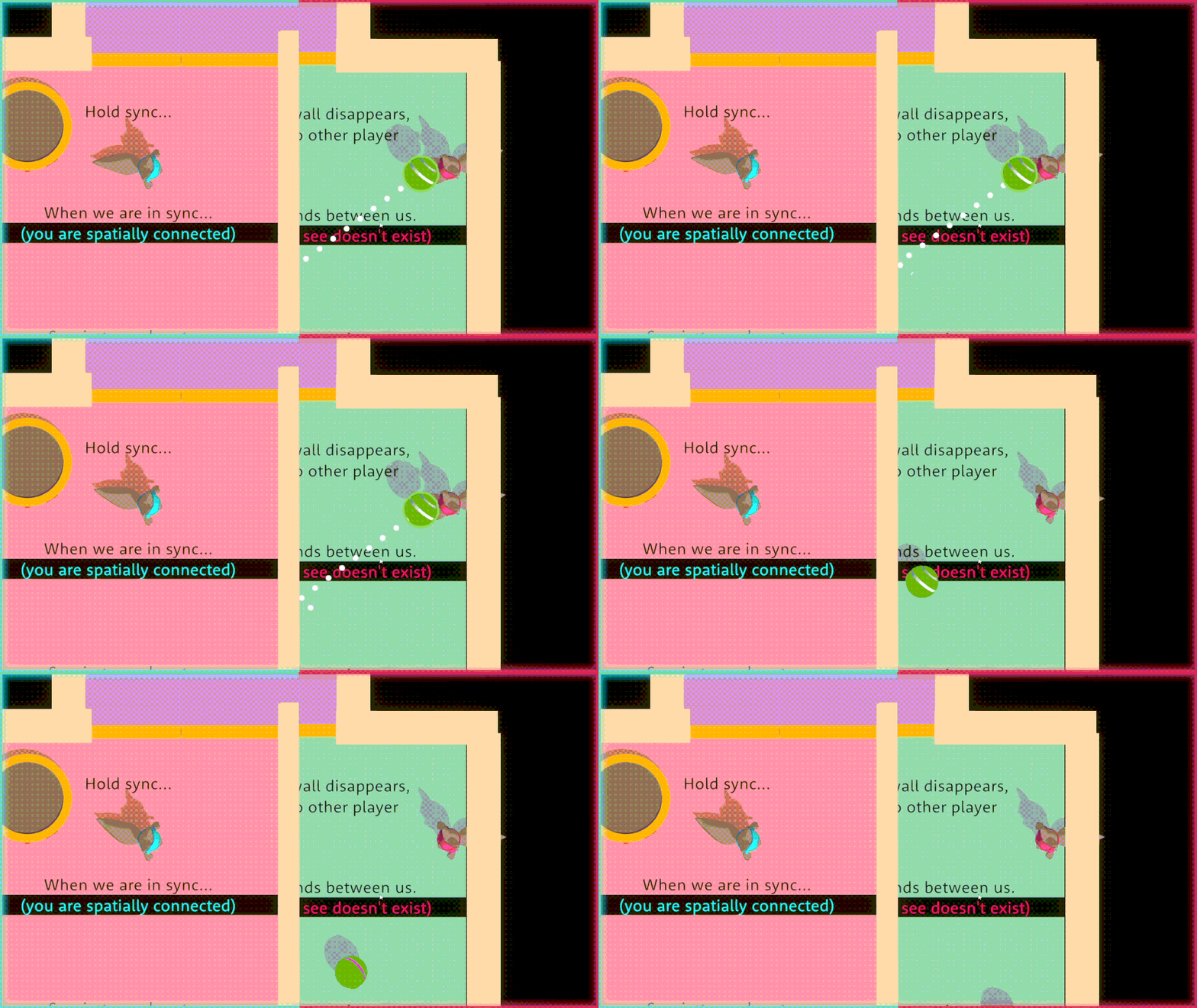
What happens if, while an object is attempting to cross over, the rift is positioned to intersect solid geometry?
Per the earlier design philosophy, since the geometry is visible to players, it should exist and factor into physics simulation. In other words, it should block the object from crossing over, parhaps even repel the object back to provide correct rejection that what they are attempting will not work.
Relying on the physics callback OnTriggerEnter will actually not be reliable in this case, due to a common optimization technique implemented by the underlying physics engine. Collision volumes are typically represented as convex hulls of primitive shapes, and contacts will typically be solved for surface collisions. A built-in assumption is that objects don't spawn inside of another primitive volume, which is the smallest unit of collision solvable.
Conversely, this happens to be one of the most frequently-encountered edge cases. It's almost as if every player is curious to see a physics-subversive behavior, on a subconscious level.
In this particular edge case, the projected clone will very much be spawning inside another geometry, depending on player positioning. In case of the rapidly-moving riftable object defined above, B will immediately pick up A's original velocity and resume moving. Due to its dynamic moving nature, the physics engine is forced to recalculate more often, and can occassionally capture OnTriggerEnter and OnTriggerExit events, though this is unreliable at best.
The solution then is to check for this edge case and intercept its handling accordingly.
if (TryBlockCrossover(out var hit)) // manually check for invalid crossover attempt
{
  //Debug.LogWarning("Recoil while rifting, reflecting force back!");
  Vector3 bounceVelocity = Vector3.Reflect(rb.velocity, hit.normal);
  rb.velocity = bounceVelocity; // bounce back if invalid placement next frame
}
else
  // follow default system-defined behavior
The method TryBlockCrossover is defined on the parent PickUpObject.cs. Before we deep dive into how this is implemented, below are some member fields of note:
OverlapSphereCheckCenter: to simplify invalid intersection for complex geometry, every riftable object is given a simplified primitive sphere. This represents the center of said sphere, which would coincide with the object pivot in most cases, sans special shapes.OverlapSphereCheckRadius: similarly, this value controls the extent of how much space the invalid overlap sphere occupies. In most instances this matches up with the object'sBounds.extents.
protected bool TryBlockCrossover(out RaycastHit block)
{
  return TryPreviewBlockCrossover(out block,
    OverlapSphereCheckCenter - rb.velocity.normalized * overlapSphereCheckRadius,
    rb.velocity,
    overlapSphereCheckRadius * 2 + rb.velocity.magnitude * Time.deltaTime);
}
Specific to the TryPreviewBlockCrossover method, these parameters are defined:
projectedOrigin: for the fast-moving riftable body, this point is calculated as the position ofOverlapSphereCheckCenterthe previous physics frame. This is to account for objects that would end up intersecting geometry upon exiting the rift. This approach works well for thin geometry, which is the case for most of the walls in the current level design.projectedMomentum: this expects the current velocity of the moving body to determineRaycastdirection.projectedDistance: defines how long the raycast should be evaluated. Since theRaycast.originis taken from last frame, we use the overlap sphere's diameter multiplied by the rigidbody'svelocity.magnitudewithinTime.deltaTimeto compensate and forecast its trajectory within the next frame.
public bool TryPreviewBlockCrossover(out RaycastHit block,
  Vector3 projectedOrigin = new(),
  Vector3 projectedMomentum = new(),
  float projectedDistance = 0)
{
  return Physics.Raycast(projectedOrigin, projectedMomentum, out block, projectedDistance, invalidOverlapPlacement);
}
Together, these mechanisms come together to define a consistent behavior for the physics-subversive edge case:
Laser and indicator preview
A little well-known fact that makes for interesting BTS trivia about the game: the throw trajectory visualizer is actually just a differently-textured laser (shoutout to Yufan's frugal thinking for the creative reuse!)
By adopting the same approach, the throw indicator could preview whether an object would successfully crossover the rift.
protected override bool CheckObstructing(bool isRifting, ref Ray ray, out RaycastHit hit)
{
  Assert.IsNotNull(throwable);
  Vector3 crossoverProbeOrigin = ray.origin - ray.direction.normalized * wallThickness;

  // if crossover is blocked by wall from other side
  if (Riftable && isRifting &&
    throwable.TryPreviewBlockCrossover(out hit, crossoverProbeOrigin, ray.direction, wallThickness))
  {
    // manually calculate reflection from last Terminal point, i.e. first Rift impact point
    Vector3 firstRiftImpact = segments[0].GetPosition(1);
    Segment.SetPosition(0, firstRiftImpact);
    ray.origin = firstRiftImpact;
    ray.direction = Vector3.Reflect(ray.direction, hit.normal).normalized;

    return false; // manually terminate laser after reflection
  }

  return base.CheckObstructing(isRifting, ref ray, out hit);
}
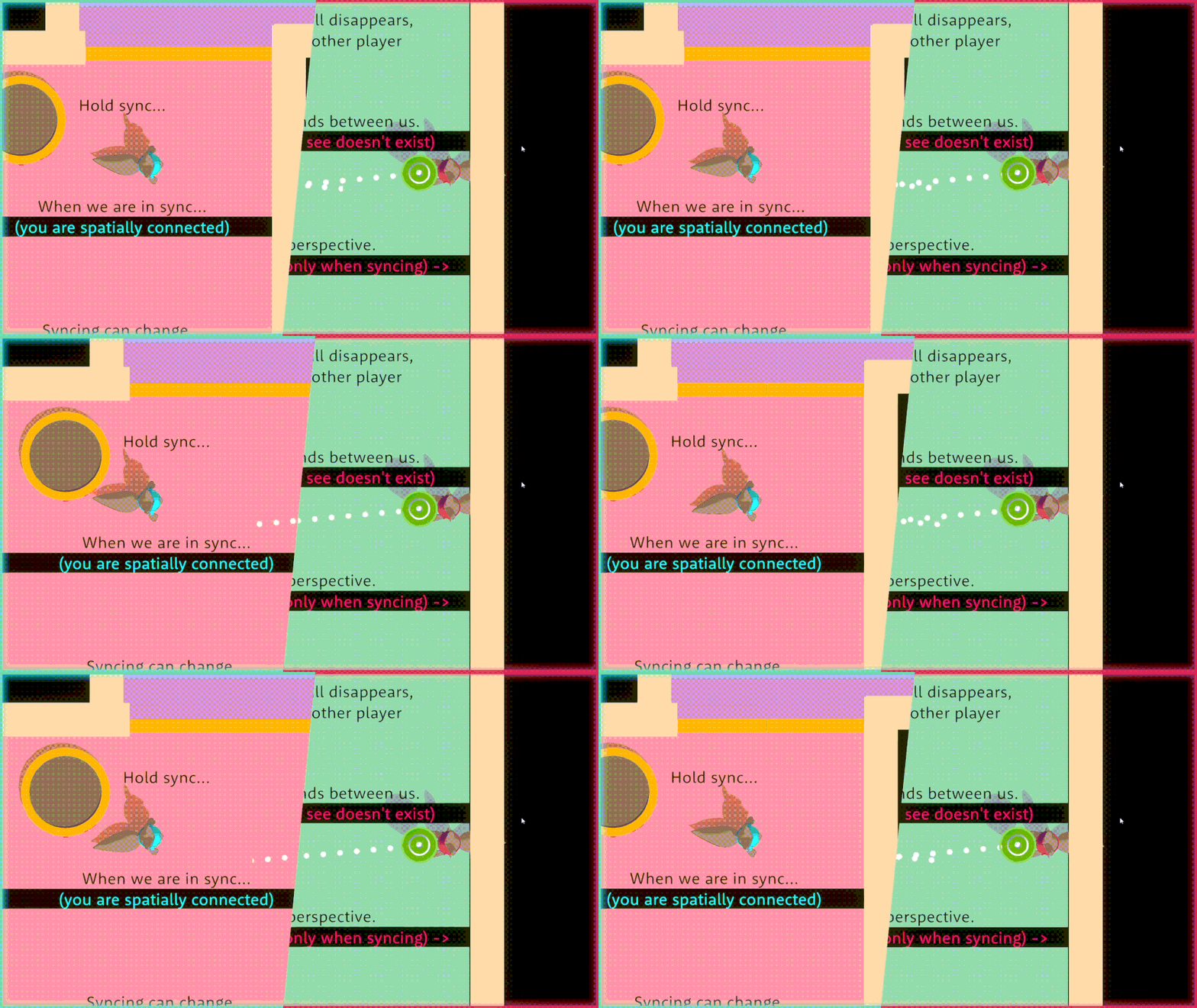
However, discrepancies between the static indicator and the actual thrown trajectory is inevitable, as other factors influencing the object's velocity is unavailable during preview. A placeholder constant wallThickness value is defined to substitute the throw-time velocity in the backtrack and forecast calculations. This, however, leads to certain drawbacks:
- This value affects the sensitivity of the blocking prediction; the higher the
wallThickness, the further back the blocking trace will be sampled. - This will lead to discrepancies where the indicator prediction - with a high enough
wallThicknessvalue - hits an occluded object within the in-between zone and incorrectly previews a recoiled trajectory, where the actual object would crossover successfully if thrown. - Vice versa, if the thrown object has a higher velocity than the flat coefficient stub, its illegal state prevention mechanism might register a surface within the occluded zone that would block its crossover attempt, where this escapes detection with the lower simulated wall thickness for preview purposes.
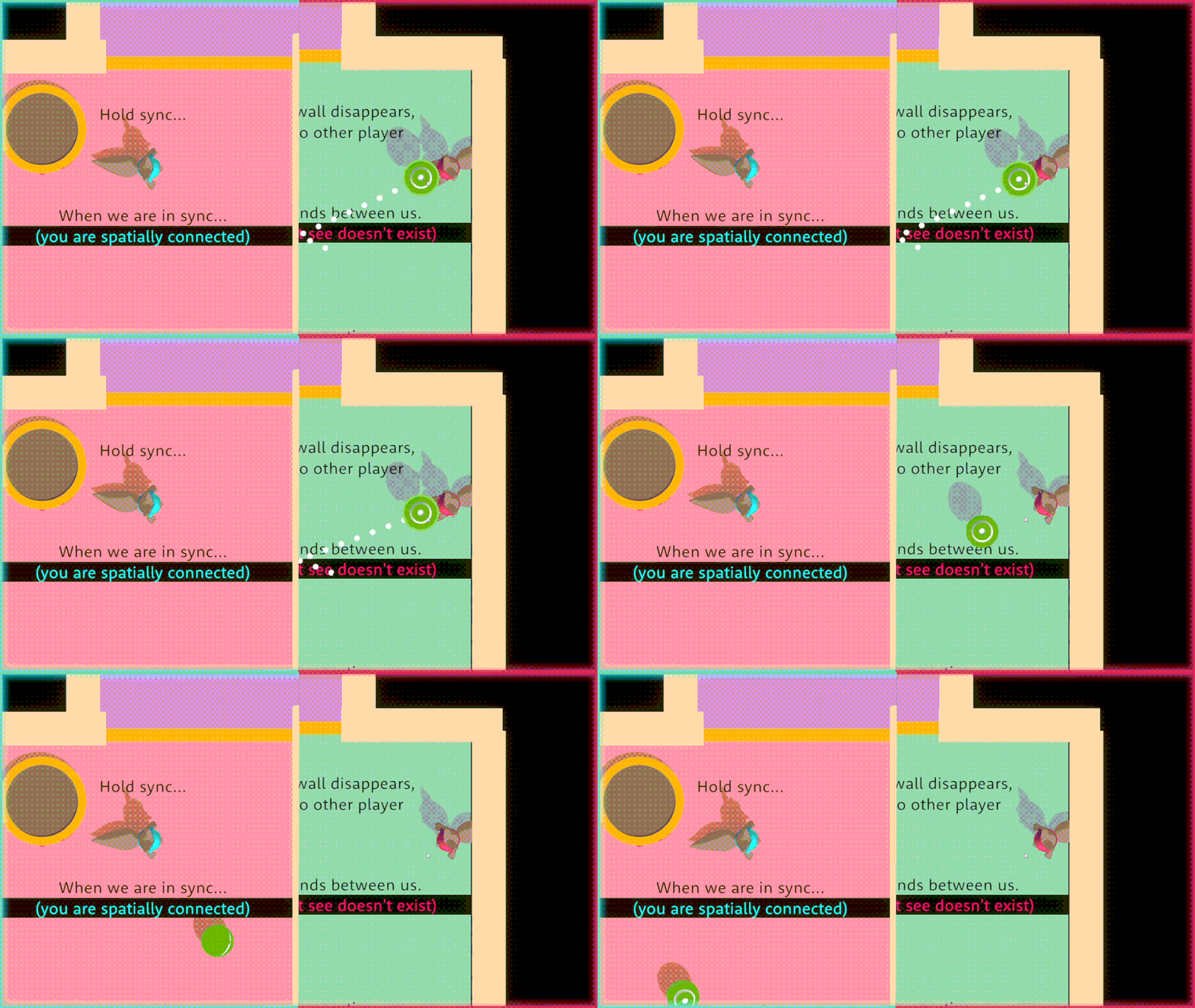
Project organisation
While the scope of the technical innovations that go into making the experimental mechanics possible is not too overwhelming, the depth of complexity arising from custom-defined behavior can quickly get out of hand, without the proper structure in place.
High-level
Overall, the prototype is heavily flavored by a service-oriented architecture (SOA), following an event-driven paradigm to orchestrate cross-cutting concerns.
The prototype relies on using layer manipulation and presetting a custom collision matrix to fine-tune which entities to observe collision events from. As such, objects' statefulness are often tied to their currently assigned layer in the editor. This enables straightforward internal state observability and systematic predictability of behavior.
Implementation
Riftable objects
With the requirements outlined above, the interface for a riftable object can be standardized to expose certain fields and methods:
public interface IRiftable : IRespawnable
{
  LayerMask Riftable { get; }
  RiftingLayer Rifting { get; }

  bool IsGhost { get; }
  bool Ghosting { get; }
  IRiftable Ghost { get; }
  Vector3 Position { get; }

  Entanglement Attachment { get; }

  /// <summary>
  /// Callback for decommissioned riftable to alert its ghost has fully taken over.<br/>
  /// <c>Sender</c> will be the newly commissioned ghost.
  /// </summary>
  event EventHandler OnPossess;

  void AttachTo(Rigidbody rb);
  void DetachFrom(Rigidbody rb);
  void ActivateGhost(Vector3 position, LayerMask ghostLayer, LayerMask selfLayer);
  void DeactivateGhost();
  void PossessGhost();
}
The rough inheritance hierarchy for riftable objects can be summarized as followed:
Tethered objects
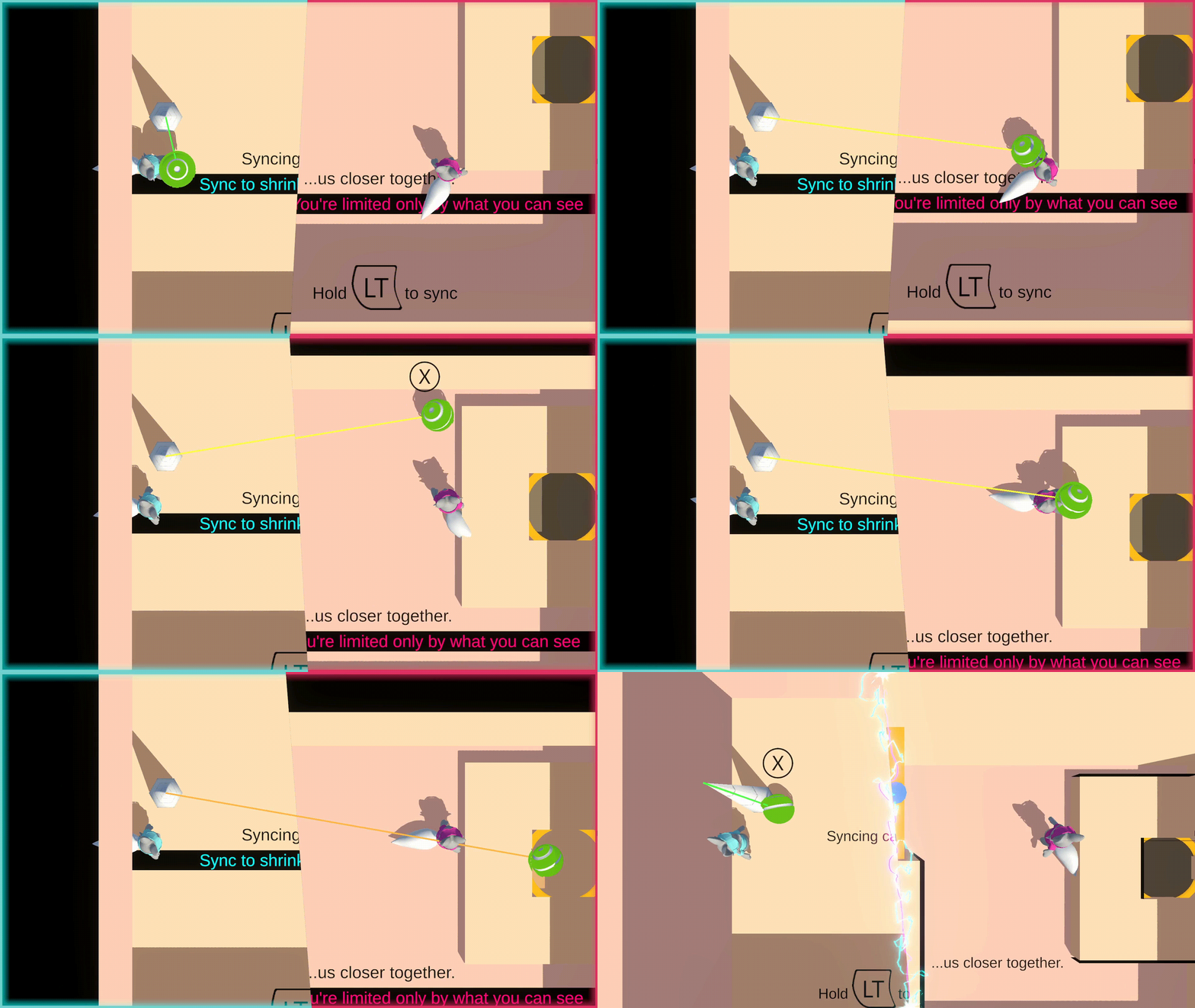
Validating tether
The normal tethered ball variant is rather simple to implement: a fixed force is constantly applied to the tethered object, scaled by the amount of overshot from the maximum distance to its anchor.
private void RecalculateTether(Vector3 riftSegmentStart, Vector3 riftSegmentEnd)
{
  // ...
  ITetherable nearest = AnchorNearestBody;
  distanceToAnchor = (nearest.Position - anchor.position).magnitude;

  if (distanceToAnchor >= snapTetherLength)
  {
    // vfx and sfx
    tetheredObject.Snap(transform.position + defaultTetheredOffset);
  }

  float overshot = distanceToAnchor - maxTetherLength;
  tetheredObject.UpdateTether(new(overshot, tetherDirection.normalized));

  // update tether visuals...
}
private TetherAttachment tether;
public Vector3 TautPull => tether.overshot <= 0
  ? Vector3.zero
  : tether.overshot * tether.direction;

public void UpdateTether(TetherAttachment tether)
  => this.tether = tether;

public void Snap(Vector3 position)
{
  if (rb.isKinematic) Release();
  rb.position = position;
}

private void FixedUpdate()
{
  if (tether.overshot <= 0) return;

  if (rb.isKinematic)
  {
    // player movement auto restrict if holding ITetherable with non-zero TautPull
  }
  else
  {
    rb.AddForce(TautPull * tetherForce, ForceMode.Force);
  }
}
It is much more complex to handle a currently-rifting tethered object, because several pre-defined conditions must be met:
- Both the anchor and the object itself must be visible.
- Once crossover, the object must remain within the visible area (i.e. the tether must always stretch across the rift).
- The tethered object must be under the effect of the correct taut force at all times:
- Before crossover (i.e. in normal physics space), the tethered object must be constrained within a maximum radius from its anchor, regardless of visibility.
- During crossover, the tethered object must be pulled back in the direction of the tether. Another way to visualize this is to imagine the anchor pulling the object towards itself in screen space.
- Upon exiting the crossover state:
- If the object is thrown/pulled back over the rift, the effects of normal physics (3.1) must seamlessly resume on the anchor-nearest copy1.
- If either the object or its anchor loses visibility (1), the effects of normal physics (3.1) should also resume, but on the anchor-furthest copy2.
- If the rift collapses during crossover (either player lets go of the Sync button or physically move close enough together), the effects of normal physics (3.1) should resume on the anchor-furthest copy.
- Regardless of crossover state, the correct length of the tether must be factored into taut force calculations:
- While not in crossover, this refers to the actual distance from the object to its tether in normal 3D physics space.
- During crossover, in accordance with the design philosophy, this corresponds only to the stretch of tether visible in screen space.
Parallels between the standard tether behavior and its riftable variant can be broken down and examined in further depth.
Visuals
Visually, during crossover, 2 extra points of interests are determined: the first rift's entry and second's exit point of contact. With these additional stops provided to the LineRenderer, the tether will be folded in a Z shape, with the first and last segment visible and aligned in screen space.
if (!rifting)
{
  tetherRenderer.positionCount = 2;
  tetherRenderer.SetPositions(new Vector3[] {
    anchor.position,
    nearest.Position,
  });
}
else
{
  tetherRenderer.positionCount = 4;
  tetherRenderer.SetPositions(new Vector3[] {
    anchor.position,
    riftSegmentStart,
    riftSegmentEnd,
    visible.Position,
  });
}
To determine these helper points, good 'ole geometry is used:
- After offseting the anchor by the
RiftTranslationamount, we get aGhostAnchor. - Performing a reversed raycast from the object to this
GhostAnchor, we get the first intersection point, the exit point of contact on the anchor-furthest rift. - Applying the inversed
RiftTranslationagain on this point gives back the entry point of contact on the first rift.
private bool TryGetRiftedSegment(out Vector3 riftSegmentStart, out Vector3 riftSegmentEnd)
{
  ITetherable visbleTetheredObj = VisibleBody;
  if (visbleTetheredObj != null // when rifting, both objects guaranteed to be visible
    && riftTraversal.TryGetCloserRift(anchor.position, out RiftBarrier rift))
  {
    Vector3 ghostAnchor = anchor.position + rift.Translation;
    Vector3 directionToAnchor = ghostAnchor - visbleTetheredObj.Position;
    Ray ray = new(visbleTetheredObj.Position, directionToAnchor.normalized);

    if (Physics.Raycast(ray, out RaycastHit hit, directionToAnchor.magnitude, riftLayer)
      && hit.transform != rift.transform)
    {
      riftSegmentEnd = hit.point;
      riftSegmentStart = riftSegmentEnd - rift.Translation;
      return true;
    }
  }

  riftSegmentStart = Vector3.zero;
  riftSegmentEnd = Vector3.zero;
  return false;
}
Tether distance
Depending on whether the object is in crossover, the tether direction can be specified to be:
- The direction from the object to the anchor in 3D world space, when not crossing over.
- The direction from the object to the exit point of contact on the furthest-away rift in 3D world space. As the anchor, 2 points of rift contacts and object are all aligned in screen space, it will appear the object is being pulled back to the anchor across the rift.
Correspondingly, the tether distance can also be specified to be:
- The distance to the anchor in 3D world space, when not crossing over.
- The distance from the anchor to the first entry point of contact on the closest rift, plus the distance from the second exit point of contact on the further rift to the object. Semantically, this sum makes up the visible stretch of the tether in screen space.
Vector3 tetherDirection =
  (rifting ? riftSegmentEnd : anchor.position)
  - tetheredObject.Position;

if (rifting)
{
  distanceToAnchor =
    (visible.Position - riftSegmentEnd).magnitude
    + (riftSegmentStart - anchor.position).magnitude;
}
else
{
  distanceToAnchor = (nearest.Position - anchor.position).magnitude;
}
Inheritance breakdown
Admittedly, this is when inheritance proved to be an ill-fitting solution for the problem. Originally I tried to make the tethered object a self-managed entity extending from the base RiftableObject, but then I ran into the issue of how to also add another non-riftable variant without duplicating the tether-specific logic.
Eventually, I decided to encapsulate an IRiftable inside the TetheredObject, and implement the TetheredObject so that it handles the tether behavior for both a normal ITethered and IRiftable accordingly, depending on the actual object passed at runtime. This decision encourages simplicity as the same TetheredObject logic could be reused for both scenarios, however it also promotes a certain degree of coupling between the tether behavior with the IRiftable interface. Future extensions are also more difficult, as adding new behaviors could potentially break existing logic.
TetheredThrownRiftable is then derived from ThrownRiftable, implementing the extra ITethered interface on top. This means some logic must be duplicated from TetheredObject, as C# doesn't provide multiple-parent inheritance. Ultimately, the problem can be viewed as chosing which base class to inherit from, as the remaining other base class would need to have its logic duplicated over. The choice to extend from ThrownRiftable was made simply out of pragmatism, due to the much deeper complexity of rift interactions, compared to the tether logic handling.
Laser
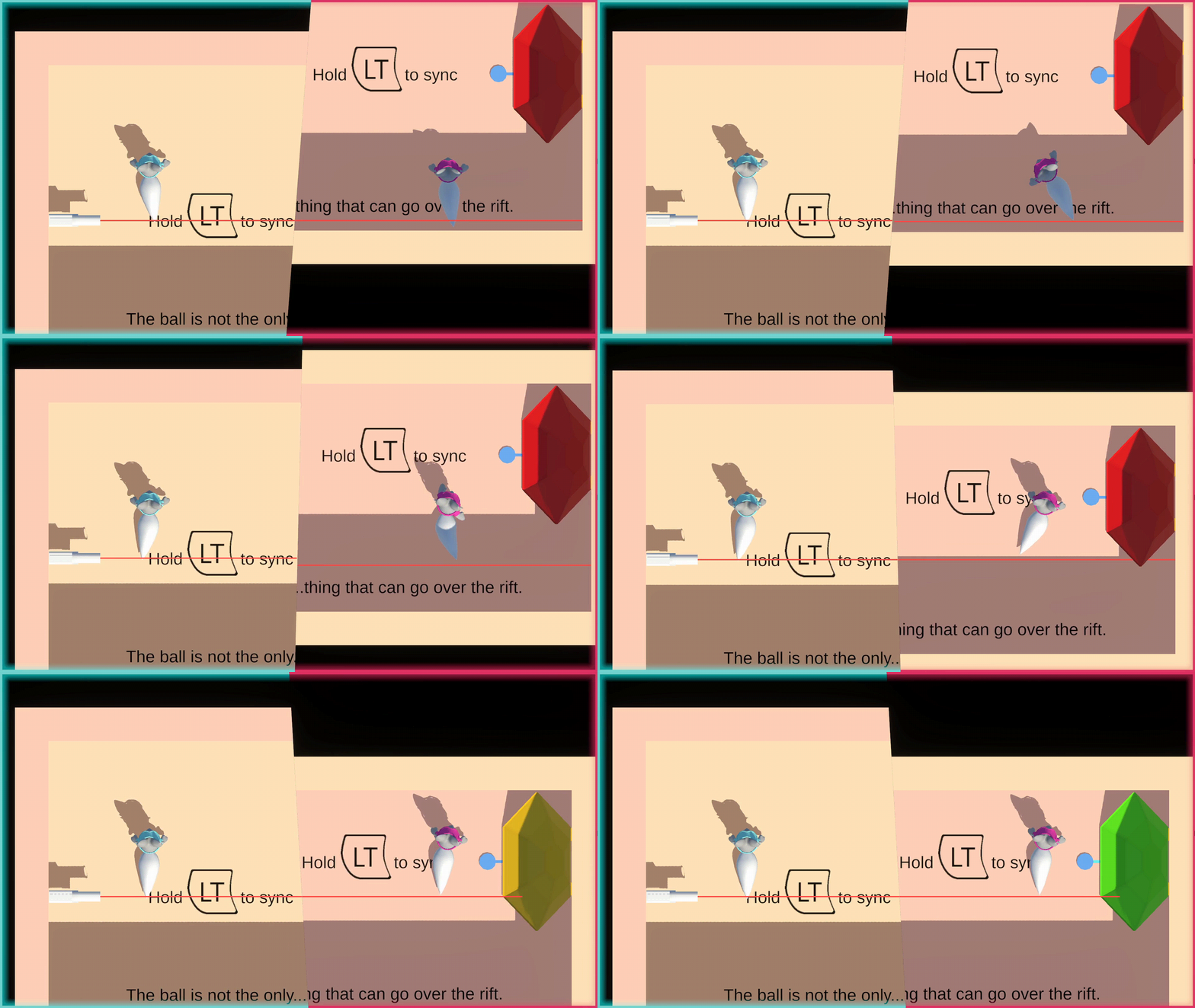
Traditional variant
Surprisingly, implementing the laser is much simpler than anticipated. The main gist of the laser implementation resides in the Recalculate method, which is called every physics update frame:
private void Recalculate()
{
  contactPoints.Clear();
  currentContactPoints.Clear();

  Reset();
  Project(Initial);
  if (probe != null) RefreshProbe();

  // sfx & vfx...
}
This function delegates the responsibility to a recursive Project() call:
private void Project(Ray ray, bool isRifting = false)
{
  GetSegmentFromPool();

  Segment.positionCount = 2;
  Segment.SetPosition(0, ray.origin);
  if (CheckObstructing(isRifting, ref ray, out RaycastHit hit))
  {
    TerminalPoint = hit.point;
    totalSegmentLength += hit.distance;

    PlaceContactVFX(hit);

    if (TryRift(hit, ray, out Ray rifted))
      Project(rifted, true);
    else if (CheckReflective(hit.collider))
      Reflect(ray, hit);
    else
      UpdateTerminalVFX();
  }
  else
  {
    TerminalPoint = ray.origin + ray.direction * RemainingSegmentLength;
    totalSegmentLength += RemainingSegmentLength;

    UpdateTerminalVFX();
  }
}
And the final missing piece of the puzzle, the Reflect() recursive callback that handles collision against reflective surfaces:
private void Reflect(Ray ray, RaycastHit hit, bool isRifting = false)
{
  if (Segment.positionCount - 2 >= MaxBounce)
    return;

  Segment.positionCount += 1;

  Vector3 hitPoint = hit.point;
  Vector3 reflectionDirection = Vector3.Reflect(ray.direction, hit.normal).normalized;
  Ray reflectedRay = new(hit.point + reflectionDirection * Vector3.kEpsilon, reflectionDirection);

  if (CheckObstructing(isRifting, ref reflectedRay, out hit))
  {
    TerminalPoint = hit.point;
    totalSegmentLength += hit.distance;

    PlaceContactVFX(hit);

    if (TryRift(hit, reflectedRay, out Ray rifted))
      Project(rifted, true);
    else if (hit.collider.CompareTag("Reflective"))
      Reflect(reflectedRay, hit);
    else
      UpdateTerminalVFX();
  }
  else
  {
    //Debug.DrawLine(hitpoint, hitpoint + reflectionDirection * maxSegmentLength, Color.blue);
    TerminalPoint = hitPoint + reflectionDirection * RemainingSegmentLength;
    totalSegmentLength += RemainingSegmentLength;
  }
}
A TriggerVolume is positioned up-to-date at the terminal point, to activate laser receptors.
private void RefreshProbe()
  => probe.transform.position = Segment.GetPosition(Segment.positionCount - 1);
Visually, the laser is represented with a simple LineRenderer, with HDR-enabled bloom post-processing to emit a soft glow. The Laser script is responsible for determining the placement of laser contact points, by extension paricles VFX and ambient audio playback.
Riftable variant
Extending upon the base laser behavior to integrate it with the custom rift logic turns out to be much more straightforward than meets the eyes. The base Laser need only define a virtual TryRift stub to account for the special occasion when a laser beam attempts a rift crossover, which will be implemented by the RiftableLaser.
protected override bool TryRift(RaycastHit hit, Ray current, out Ray rifted)
{
  GameObject hitObject = hit.collider.gameObject;
  if (pool.Any() && hitObject.InLayerMask(riftLayer)
    && hitObject.TryFindImmediateComponent(out RiftBarrier rift)
    && traversal.IsVisible(hit.point))
  {
    rifted = new(hit.point + rift.Translation + current.direction * Vector3.kEpsilon, current.direction);
    return true;
  }
  rifted = default;
  return false;
}
To match the design philosophy of "what the player sees goes", the laser will only successfully crossover if it's visually intersecting the rift on-screen. To accomplish this, the RiftableLaser has a dependency on the RiftTraversal service, in order to track if the point of contact is in-between rifts or within visible area.
Internally, the RiftableLaser employs a pool of segments, each representing a continuous, uninterrupted section of laser. This includes local reflection (i.e. bounce that doesn't cross over the rift). The number of segments initialized in the segment pool defines the maximum number of times the same laser can crossover back and forth the rift.
This approach is not the most optimal solution, as every physics frame a number of raycasts (up to maxBounce * segmentCount) is performed, each with a sampling distance up to maxSegmentLength, to recalculate the laser's current trajectory and update its visuals/physics probe accordingly. As such, level designs are typically constrained to only using up to two lasers within a scene, each with a modest maxBounce and segmentCount value defined.
Lessons learnt and future suggestions
Composition over inheritance
While inheritance serves its purpose in OOP, the canonically Unity way to implement behaviors is to decompose into behavior-defining components, rather than establishing a longer chain of inheritance with subclass. In this particular implementation, this approach notably fell short via the inflexibility caused by single-parent inheritance in C#, requiring logic duplication for classes that extend from a combination of pre-established bases.
A prime example is the ThrownRiftable object, which extends from ThrowableObject and implements the IRiftable interface separately on top, duplicating the majority of the same logic from RiftableObject.
With composition, we should arrive at something more like:
ThrowableObjectwould be aGameObjectwith only theThrowablebehaviour attached.RiftableObjectwould be aGameObjectwith only theRiftablebehaviour attached.ThrownRiftablewould be aGameObjectwith both theRiftableandThrowablebehaviours attached.
Skinny interface
While the standardization of interfaces for defining these common behaviors somewhat alleviated the worst of the problem, they inadvertently paved the way to another pitfall: they became too involved with the internal implementations of a particular behavior, rather than serving as a decoupled contractual interface.
In fact, this was reflected via the number of classes that actually implemented a given interface. The IRiftable interface was one of the few that actually proved effective. Others, such as the IEntity interface for respawning an object upon falling out of the playable level boundary, was implemented solely by a ubiquitous Entity class, which renders the effort of extracting the interface out a moot point.
Automation to accelerate boilerplate generation
The SOA-inspired architecture helps eliminate Unity's pseudo race condition (i.e. the undefined behavior where relying on Awake and Start being called in a certain sequence is not guaranteed, without the need for specifying any script execution order). While it can be argued that this shifts the overall development paradigm to be heavier on the script side than the serialized editor side, this doubles back to the age-old argument of script-driven versus editor-serialized workflows3. Personally, I'm more biased towards a script-driven initialization routine, for obvious reasons.
Being able to define new behaviors - that by themselves are services, and consume other services via a standardized interface - led to a much better developer experience. Just from a glance at the start of every script, I can immediately tell what are its dependencies, thus inferring at a high-level surface its implementation. I no longer need to worry about how to pass a particular dependency to a component, because almost assuredly another existing module is already using the exact same provider, with good chances for the same reasons. Creating a new script, then, became a matter of finding the correct script to borrow a skeleton from.
This process quickly became tedious, however. With such a streamlined dependency system, it was definitely possible to write an automated script initializer that can accept a list of dependencies and quickly spin up a boilerplate starter script, with all the wirings setup and ready to hit the ground running. It could even intelligently scan the codebase for existing components that are already using the same dependencies, and integrate those specifics into the initialization boilerplate. This could cut down a huge chunk of development time, allowing the actual emphasis to be placed on implementing the functionality instead.
Last remarks
A more holistic approach
At its heart, Rift & Sync was always more of a pet project where I proved to myself I could take a creative vision I have and prototype it into reality. As such, the technical innovations get a lot of attention, while other aspects of its development (namely narrative, level design, UI/UX, ease of onboarding, etc) usually came second.
At the end of the day, I'm proud of what I made. But the prototype, as it stands, fits better as a proof-of-concept to demonstrate a novel mechanic to experienced gamers and akin-minded developers, rather than a commercially viable product designed for mainstream consumption.
With this blog being a technical behind-the-scene exposé, I won't touch base too deeply on the overall development journey. Nevertheless, I do believe the game would have benefitted under a more comprehensive development direction. This was particularly notable from my own contributions as the creative director/producer and main programmer, where my own interests were conflicted between making the game its best version and showcasing my chops as a technical-oriented mind.
Wrapping up
And there goes it, my longest (and probably most enthusiastic) blog entry up to date! I hope you were entertained with the deep-dives I performed, and that I inspired you to go make something cool as well!
If you spotted somewhere I made a blunder, or any particular improvements/alternatives to something I did, please reach out. If it isn't already obvious from this article, I love yapping and geeking out on technical stuff!
If you had an idea for what you'd like to see in the game, or simply want to collaborate with us in future endeavours, feel free to contact us. If there's any particular aspect of the game that stood out to you, more information on us can be found on our official website.
Most importantly, if you haven't had a chance to play the game yet, grab the demo and crush it with a friend!
Time to sync up!
Footnotes
-
Of the two rifts, one will always be closer to the anchor. When the object is being thrown/pulled back towards the anchor, we want to transfer the tether end to the copy exiting this side of the rift, which also happens to be guaranteed to be the closer copy. ↩
-
Inferrable from the above observation, during crossover, the copy exiting the other rift will always be further away. ↩
-
From a non-programmer's viewpoint, going script-driven can harm traceability and observability of code execution flows, leading to more complex debugging. The other side of the argument is how Unity and serialized references generally don't play well together beyond the scope of a single scene/prefab, which can lead to tightly-coupled game objects/scenes. ↩